Posts in release
8bitworkshop 3.7.2 Release
- 18 May 2021
- release
Some bug fixes, and some new features:
VCS: Better support for ca65 assembler, though DASM is probably still the better choice. Fixed instant replay with controllers. KIL ($02) instruction breaks into debugger. Improved cycle analysis tool that counts up to 76*4 scanlines and properly inspects JSR subroutines.
DASM: Better parsing of macros (you can step through them in the debugger) and better error messages.
3.7.0 Release: BASIC
- 31 October 2020
- release
Click here to program BASIC in the 8bitworkshop IDE now!
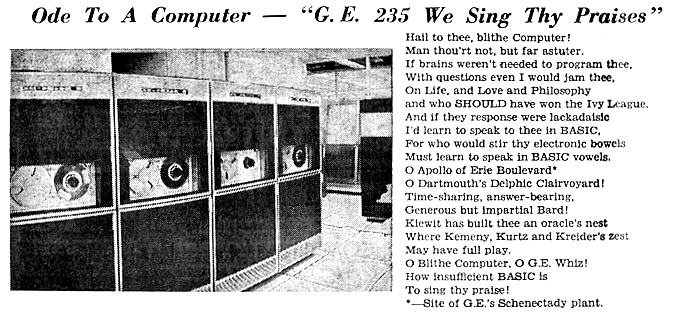
Dartmouth professors John G. Kemeny and Thomas E. Kurtz had the idea that every student should have access to a computer. But in those days, batch processing was the law of the land. Programmers would fill out a coding sheet, then a keypunch operator would create a deck of punch cards. The cards were fed into machines, and hours later you might receive results from your program – or if you were unlucky, an error report.
8bitworkshop 3.6.0 Release
- 19 July 2020
- release
The 8bitworkshop IDE 3.6.0 is out, and we’ve added five more awesome platforms, as well as some nifty new debugging features!
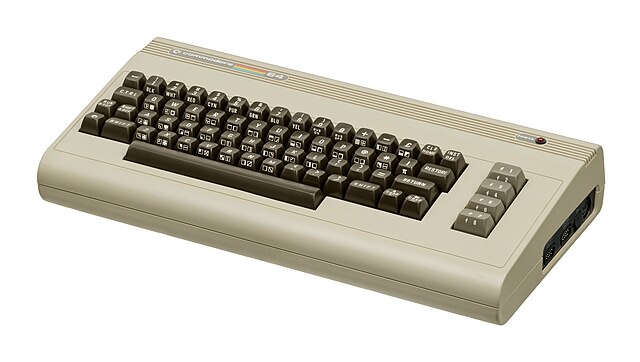
Commodore’s VIC-II graphics and SID sound chip were originally destined for a next-gen game console. Engineering convinced CEO Jack Tramiel that a low-cost 64KB computer would be profitable, and thanks to having their own semiconductor fab (acquired from MOS Technology, along with the 6502) they were able to design the chipset in about five months.
8bitworkshop 3.5.0 Release
- 20 December 2019
- release
8bitworkshop now supports five additional 8-bit platforms!
8bitworkshop 3.4.0 Release
- 09 August 2019
- release
We’ve added yet another platform to the 8bitworkshop IDE, the legendary Nintendo Entertainment System (NES)!
You can program in both C and 6502 assembler, and there are a ton of examples to get you started.
The IDE lets you write C using the cc65 compiler toolchain. While it has lower performance and greater code size than a well-written assembly program, you can still write a pretty good game in C. We use a fork of Shriu’s NESLib library to interface with NES hardware features, and Famitone to play music and sound.
Designing Hardware with Verilog
- 15 December 2018
- release
Big news! You can use the 8bitworkshop IDE to write Verilog code, and see it executed instantly in real-time on a simulated CRT. Most computers are fast enough to render a game at 60 Hz, which requires simulating Verilog at almost 5 million ticks per second. This is all done in JavaScript!
For example, here’s a simple clock divider module:
The IDE instantly compiles this and starts simulating, showing the output signals on the scope:
3.2.1: batari BASIC; the Sidebar
- 25 November 2018
- release
I came across Fred Quimby’s batari BASIC while developing the first version of 8bitworkshop, and was intrigued. This is a BASIC compiler that targets the 6502, and has specific support for Atari 2600 features. For example, you might define the playfield like this:
You could then set the foreground and background colors:
And animate the playfield, scrolling it downward each frame:
3.2.0: Font tools, bankswitching, and cassette loading
- 03 October 2018
- release
New features in 8bitworkshop 3.2.0:
Keyboard Shortcuts for debugging:
Shotrcut
3.1.0: VCS Love, Instant Replay and Playable Links
- 26 August 2018
- release
In 8bitworkshop 3.1.0, we’ve given the VCS platform plenty of love:
Header Files: Header/include files are now viewable and editable via the IDE. But don’t use angle brackets in your includes, because they’ll pull in the old header file versions. Instead, use double quotes, for example:
Bugs Squashed: The emulator was suddenly stopping and displaying a blank screen, requiring a browser refresh. There were also problems when trying to load a ROM of the wrong size. Also, the Program Counter is no longer wonky when single-stepping.
Version 3.0.0 Released!
- 06 August 2018
- release
Version 3.0.0 of the 8bitworkshop IDE is out! Under the hood, there are lots of changes:
There’s a new browser storage backend, and your local changes will be migrated over the first time you start the IDE. This means you can save many more projects locally.
The site also now supports HTTPS, but be aware that local changes made on the HTTPS site won’t affect the HTTP site, and vice-versa.